Arrive and you're clocked in. Leave and you're clocked out.
AutoTimecard is an automatic time clock for your phone. Add the place you work once, and your work hours record themselves: no punching in, no daily taps, no account.
Free for the first five days with an automatic clock-in and clock-out. No account needed.
What it looks like
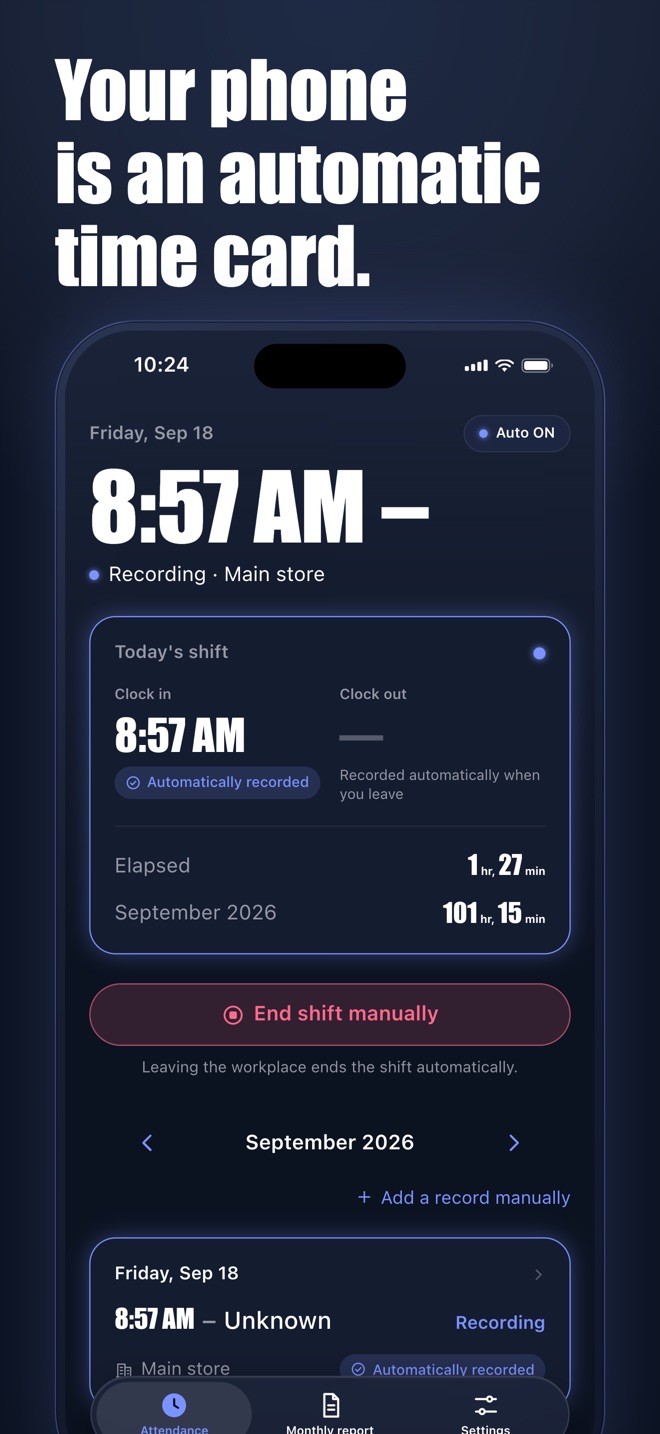
Your phone is an automatic time card.Arrive and you're clocked in. Leave and you're clocked out. No daily taps, no confirmations. 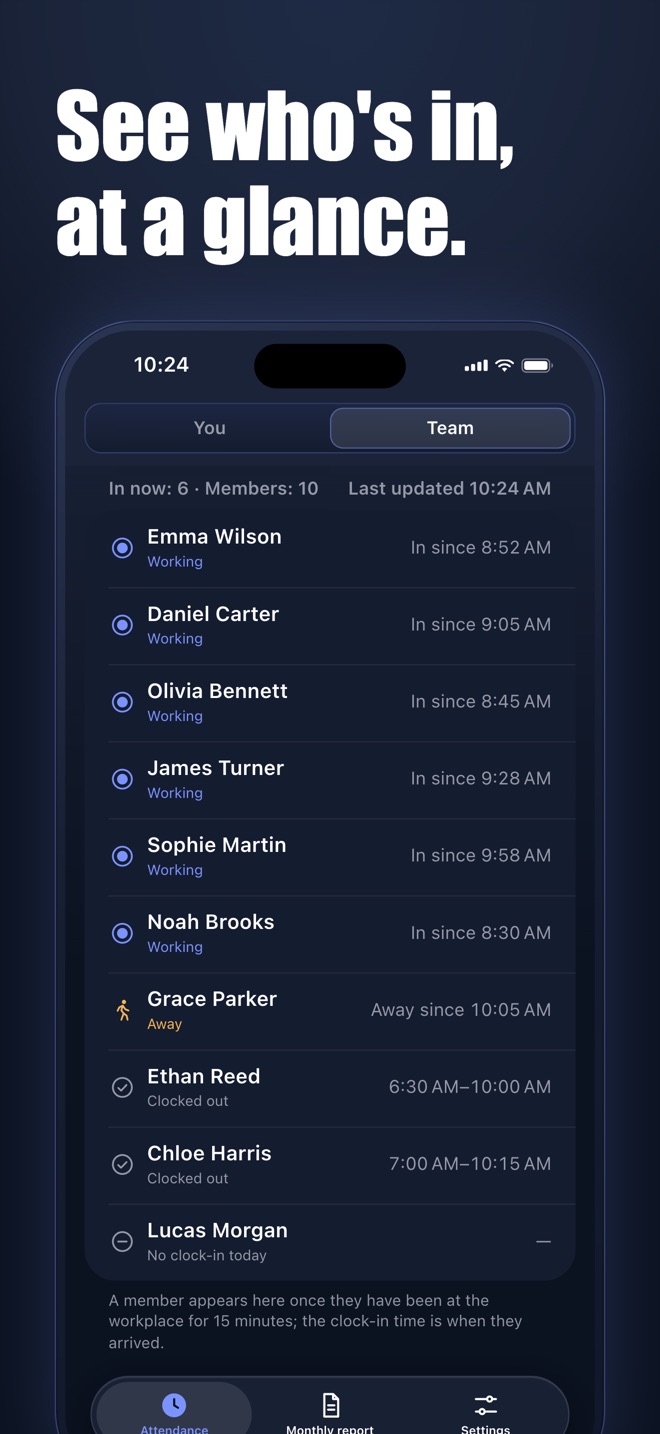
See who's in, at a glance.Members' clock-in and clock-out times reach the admin. Their locations never do. 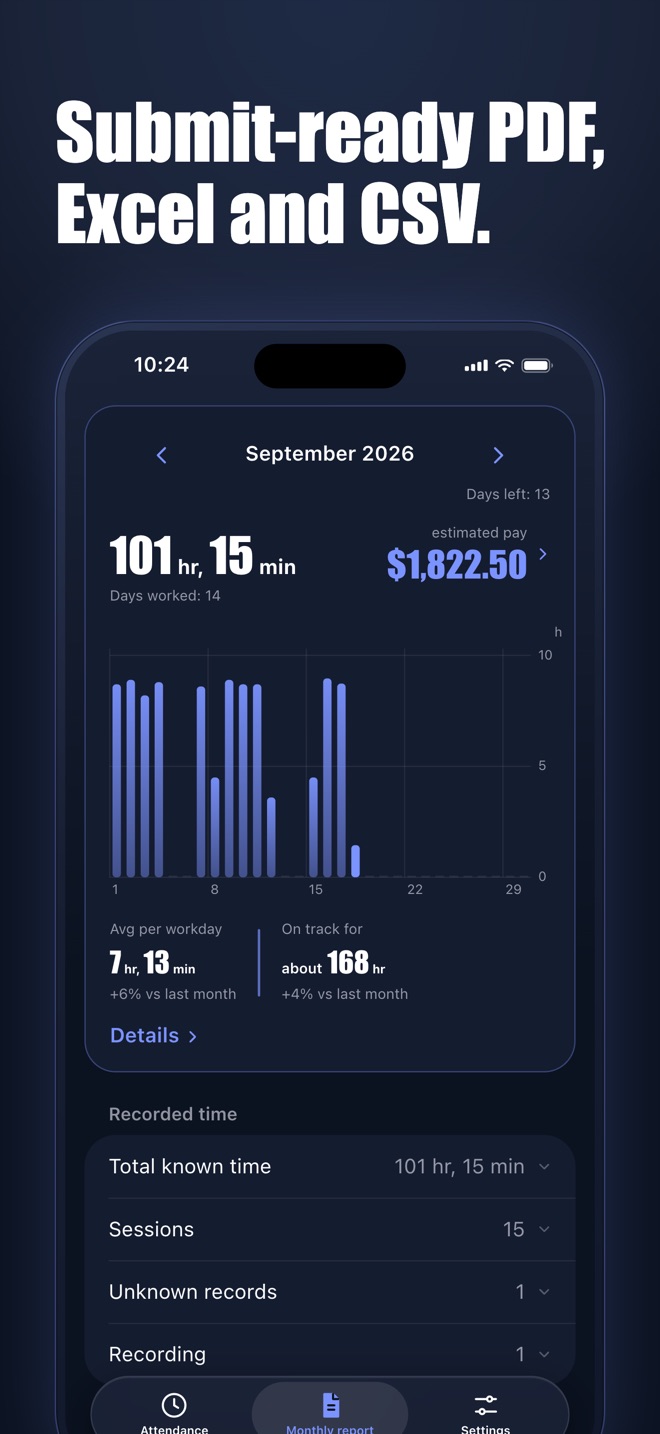
Submit-ready PDF, Excel and CSV.Monthly totals per employer, plus plain text to paste into any message. 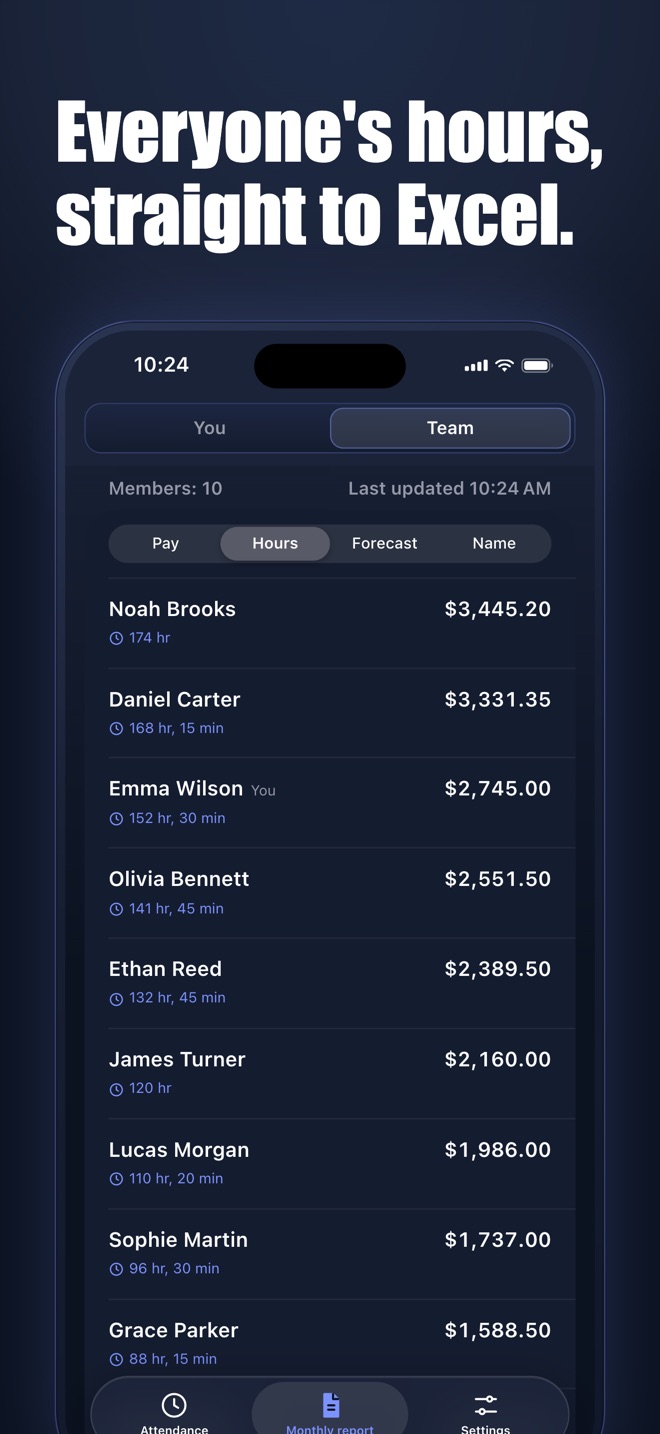
Everyone's hours, straight to Excel.Hours per member for each pay period. Export as PDF, Excel or CSV. 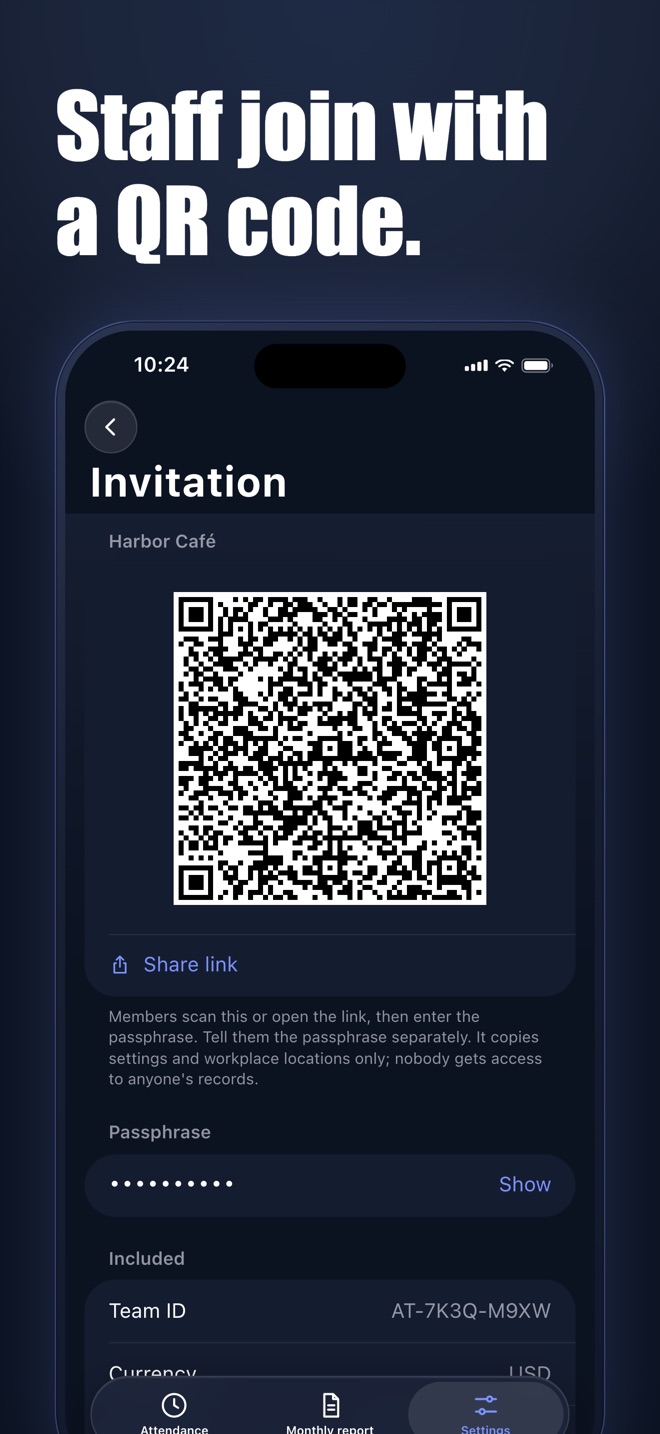
Staff join with a QR code.No accounts to create. When someone leaves, remove them and change the passphrase. 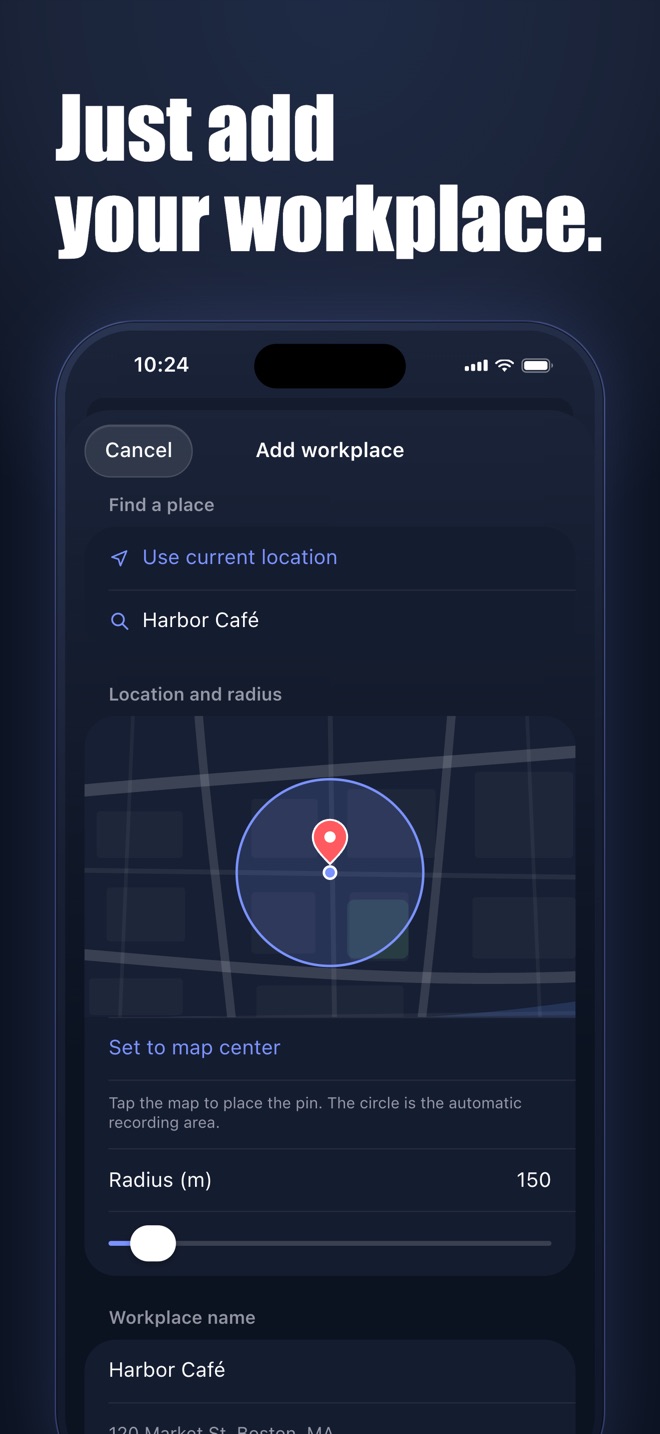
Just add your workplace.Search an address or drop a pin. The circle is your recording area. 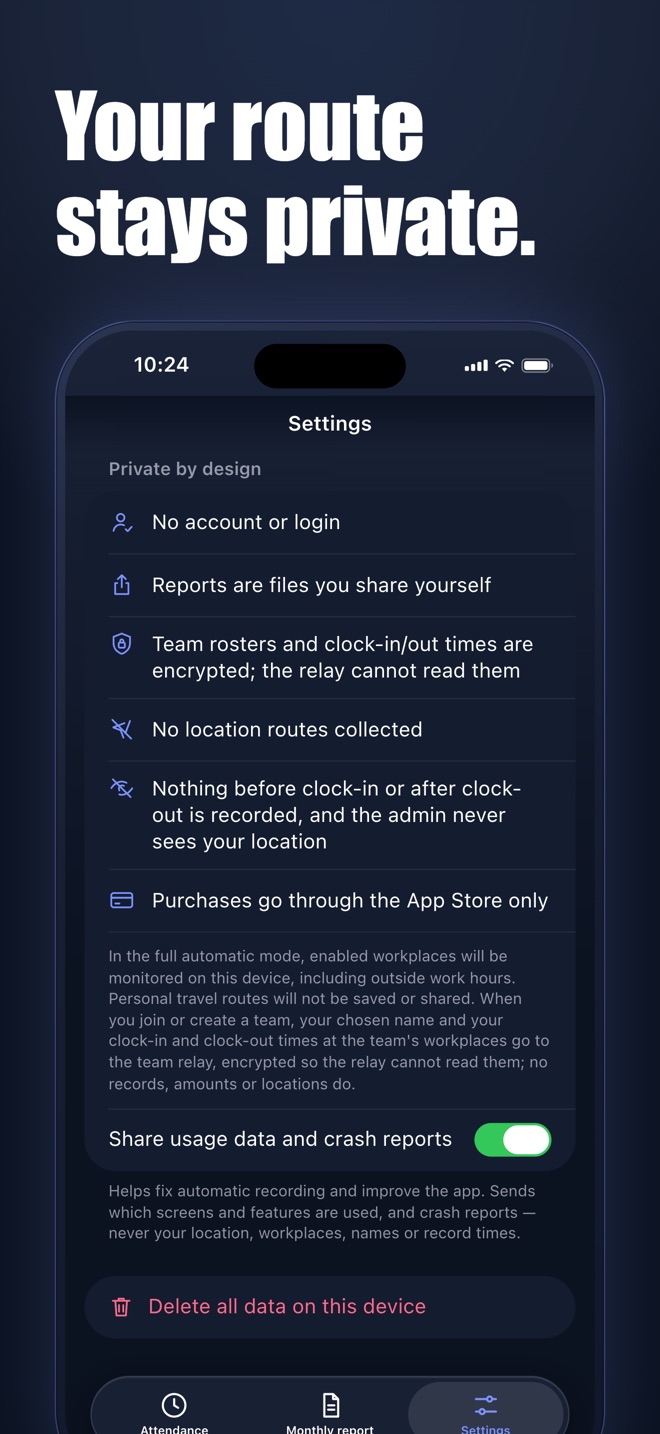
Your route stays private.Location only detects arrivals and departures at your workplaces, and never leaves your phone.
How it works
- 1
Add your workplace
Search an address or drop a pin on the map, and choose the radius of the circle around it.
- 2
Allow location “Always”
The app records while it is closed, so location access must be set to Always (iPhone) or Allow all the time (Android).
- 3
Just go to work
When your phone enters the circle, the time is saved as your clock-in. When it leaves, the time is saved as your clock-out.
What AutoTimecard does
Nothing to do each day
Records are saved as they happen. There is no daily confirmation and nothing to approve.
Honest about what it could not tell
If the phone missed an arrival or a departure, the record is marked Estimated or Unknown. It is never silently filled in, and never turned into an absence or a break.
Your corrections stay
Add, correct or delete any record by hand. Automatic estimates never overwrite what you corrected.
Timesheets ready to send
A monthly report for each employer, with its own cutoff date, exported as PDF, Excel (XLSX), CSV or plain text.
Made for real workdays
Several shifts a day, night shifts kept as one record, more than one workplace or employer, and an optional pay estimate from your own hourly rate.
Teams
Create a team on one screen; members join with a QR code or a link plus the passphrase, on iPhone or Android. The admin sees who is in and each member's clock-in and clock-out times, never their locations, and can remove a member at any time. Changing the passphrase does not affect members already in. If the admin's phone is lost, a co-admin can take over. Team data is encrypted on the phones with a team key; the server never receives the key or the passphrase.
Who it is for
- Part-time and shift workers who want their own record of the hours they worked.
- People with more than one job, a side job or freelance work who want every clock-in and clock-out in one place.
- Anyone who sends a monthly timesheet to an employer, payroll or an accountant.
- Small teams whose admin wants to see who is clocked in, without a time clock on the wall.
Location and privacy
- Location is used only to detect arrivals and departures at the workplaces you turned on.
- Your route between places is not recorded, and your location never leaves your phone.
- You can turn automatic recording off for one workplace, or for all of them, at any time.
- No ads and no cross-app tracking. Usage data and crash reports never include your location, workplaces, names or record times, and you can turn them off in Settings.
What it cannot do
Automatic detection relies on iOS and Android, and it can be delayed or missed. It shows that your phone was at a place, not what you were doing there. The pay figure is an estimate from rules you set yourself: it is not payroll and not legal advice.
Price
Automatic recording is free for the first five days that have an automatic clock-in and clock-out. After that it is a yearly subscription. The personal plan costs US$29.99, €29.99 or ¥2,900 a year; prices differ by country, and the App Store or Google Play shows yours. Team plans cover up to 10, 30 or 100 members, for US$94.99, US$239 or US$599 a year (€89, €229 or €599; ¥9,800, ¥24,800 or ¥69,800): the admin buys one plan for the whole team, and it works for members on iPhone and Android alike. Viewing, correcting and exporting your records never needs a subscription.
AutoTimecard at a glance
- What it is
- An automatic time clock and work hours tracker
- Made by
- Sense G.K. (Japan)
- Platforms
- iPhone (iOS 18 or later) and Android (8.0 or later)
- Price
- Free for the first five automatic days, then US$29.99 / €29.99 / ¥2,900 a year; team plans from US$94.99 / €89 / ¥9,800 (differs by country)
- Export
- PDF, Excel (XLSX), CSV and plain text
- Account
- None. No sign-up and no login
- Languages
- 34
Questions
Do I have to open the app or tap anything when I get to work?
No. Once a workplace is added and location access is set to Always, the phone's operating system tells the app when you arrive and when you leave, even while the app is closed.
Does it track where I go outside work?
No. It only detects entering and leaving the workplaces you turned on. It does not record your route or the other places you visit, and your location is not sent off your phone.
What happens if it misses a clock-in or a clock-out?
The record shows Estimated or Unknown instead of an invented time, and you can correct it by hand. Your correction is kept.
Can my employer see my location?
No. In a team, the admin sees clock-in and clock-out times, not locations. If you are not in a team, your records stay on your phone until you export them.
How much does it cost?
The first five days with an automatic clock-in and clock-out are free. After that the personal plan is a yearly subscription: US$29.99, €29.99 or ¥2,900 a year, depending on the country. A team plan, bought by the admin, starts at US$94.99, €89 or ¥9,800 a year for up to 10 members. There is no monthly plan.
Can I send my hours to my employer or my accountant?
Yes. Export a month as PDF, Excel (XLSX), CSV or plain text and send it from your phone. Exporting never needs a subscription.
Does it work for a team that has both iPhone and Android?
Yes. One team plan bought by the admin covers every member, on either platform.
Guides and comparisons
- How to clock in and out automatically with your phone's location
- How to send your work hours as a PDF or Excel timesheet
- Apps that clock you in and out automatically by location (2026)
- How accurate is clocking in by location, and does it use much battery?
- How to keep your own record of the hours you work
- How to see who is at work in a small team, without buying a time clock
- What a location-based time clock can know, and what it cannot
- AutoTimecard vs HoursTracker
- AutoTimecard vs Jibble
- AutoTimecard vs Shiftboard (シフトボード)
- An automatic time clock you can use without a company contract: how it differs from freee, KING OF TIME and Jobcan
- How to choose a time clock app for a small team (2026)
- How to set up a team time clock on your staff's phones
- How to use location for attendance without tracking your employees
- How to track attendance across several work sites
- How to collect your staff's hours at the end of the month
- How to reduce buddy punching and forgotten clock-ins
- AutoTimecard vs Connecteam for a small team
- AutoTimecard vs Homebase for a shop or small team
- AutoTimecard vs Clockify for a small team
- Attendance in a spreadsheet or a group chat, or an automatic app?
- How to calculate hours worked (free calculator)
- How to record your overtime hours
- How to track time for field and mobile workers
- Free shift schedule template for Excel (weekly and monthly)
- Forgot to clock in or out: what to do, and how to stop forgetting
- Automatic clock-in with iPhone Shortcuts vs a time clock app
- AutoTimecard vs Hubstaff for a small team
- AutoTimecard vs Deputy for a small team
- AutoTimecard vs When I Work for a small team
Get AutoTimecard
Free for the first five days with an automatic clock-in and clock-out. No account needed.